Showing posts with label Review. Show all posts

Tuesday, May 24, 2011

Yes, The MacBook Air Is Practical.


11" MacBook Air

 I finally did it.  After lusting after the original MacBook Air (MBA) for years, I went ahead and purchased a (refurbished) Air. I bought the 11' model with the 1.4Ghz processor, 4GB of RAM, and a 64GB SSD drive.

Since buying the Air, or even just talking about buying it, the people I've talked to about uniformly agree on two things: the first being that they all think the Air is super sexy and most would like one.  The second think they ask me is why I "need" the Air.  The want to know how it will suit me better than the 13' MacBook Pro and iPad 2 I had at the time.

Friends would tell me all the reasons why the Air was such a terrible decision and that I should just stick with my Pro.  "Think of everything that you will lose going to an Air! Smaller screen, no DVD drive, less storage, less ports, less, less, less...  But what people don't understand is that almost all of these "killer features" of the non-Air laptops are typically never used.


1.4gHz 4GB RAM 64GB SSD


I've been using the MBA for almost a month now, not once have I regretted the decision. I've used it to surf the web, made a video with iMovie, used iTunes, and even used Photoshop. Not once did I feel "compromised", I didn't need a bigger screen, nor a DVD drive, or even 4+ USB ports to get any of that done. I'm not pressed for storage either; the limited 64GB SSD has about 30GB free currently and since it's my laptop (and second computer) I don't need to store all my media on it.


2011 MacBook Air vs 2008 MacBook


Most people could easily get away with the Air being their only computer; of all the computers I get in to work on most people's media collection (music, picture, documents) is less that 5GB. Now that's just for your 'average' consumer, I know there are people out there with enormous media collections; my personal media collection is over 30GB. But even then the 128GB SSD would be more than enough to hold a large media collection. 


2011 MacBook Air vs 2011 iPad 2

The Air is fast, light-weight, with a great battery life. I can't recommend enough to someone, either as there only computer or as a great companion computer. Unless you really "need" a DVD drive (the Air can install software from any computer DVD drive on the same network PC or Mac) or lots of processing power the Air is hands done the best computer I've ever owned.

Sunday, March 13, 2011

Reviewing The iPad 2


I only have 48 hours of iPad 2 use under my belt I can tell you that I couldn't (or at least wouldn't want to) go back to the 2010 iPad. Nothing was particularly wrong with the first iPad, the have the same firmware versions, and have all the same feature save some new camera and goodies on the iPad 2.

So why do I boldly claim that I could never go back to the "old" iPad? It's just the feeling you get when you use it. I suspect that users that had never had an iPad 1 will not see what the fuss is about. They will love there new iPad all the same, but they just won't know how good they have it.

Speed, it's all about the speed.

Everything is faster on the iPad 2: switching apps, loading apps, pulling up the onscreen keyboard, web pages just blaze to life. the Internet seems faster on this device than on any other in my house, and my personal computers are not slouches. With a 2009 MacBook Pro and a 2008 iMac I have no grips with those machines in my day-to-day use, but surfing the web on an iPad has always been more personal, more comfortable. Where a desktop or laptop seem to more of a utility the iPad was designed to be intimate, it's just you and a gorgeous (responsive) 10" touch screen. It sits in your lap and is just a different experience than a personal computer... Which seems ironic because the iPad is much more personal than a PC could ever be. In fact you could even look at the "personal-ness" of the iPad to be a drawback in some cases. Like a family household that has one iPad, with multiple people using it there is no easy way to have multiple accounts on the device. So be prepared to share your Angry Birds game with the rest of your house, you can't login to a saved game all your own.

So what makes the iPad so personal, so intimate? Like most Apple products it's the combination of form+function. The new tapered edges just make it feel slimmer and easier to hold, the 10" form factor is a great size. Everything from text on webpages to games and videos are at a great size to personally view the content. While the iPad is very dense, at only 1.33lbs it is the most portable computer you'll ever carry. Whether I am sitting it on my lap or holding it portrait to read a book, it never feels cumbersome. The iPad never gets hot, hell it never gets warm! Compare that to my MacBook Pro that could cook an egg with how hot it gets, and weighs 4.5lbs, the iPad is a welcome change on my lap.

The iPad, much like the iPhone and iPod Touch, is never really "off" so the iPad has this instant on feature that is even faster than a laptop. Combine this with the fact that you never have to turn it off, like you might your laptop, the iPad is always ready to go when you are. Games and apps save you place or "state" so you can easily and quickly get back to work, or play.

Whether you use the iPad for work or play the main feature where the iPad out shines you laptop is the amazing battery life. All computer companies make ridiculous claims about their products battery life it seems, and even though Apple seems to be more realistic in their claims they have always been a few hours short in my real-world testing. But the iPad, both iPads, have far exceeded Apple battery claims no matter what I'm doing. Apple states that the iPad will get 10 hours on WiFi and 9 hours on 3G; I can tell you that with the 9 months I had my first iPad with 3G I was getting between 14-16 hours on a battery, with 80% of that time being on 3G. That's 50% more battery life than Apple claimed I should get. My short 48 hours with the iPad 2 seems to prove that I can still expect the same great performance with this years model, irregardless of the fact that it is 33% thinner than it's predecessor with a faster processor and more RAM to boot.

How about those Smart Covers? Being the fanboy I am, I couldn't help but pick up Apple's newest toy and try it out. And I gotta say this is where Apple's blend of form+function is killing (or going to kill...) it's competitors. Apple made a case for the first iPad as well, that I thoroughly enjoyed and couldn't image using that iPad without it, but this year the Smart Covers really takes the icing on the cake. I used the Apple Case the entire 9 months I had the iPad 1, and again, 24 hours with the smart covers; I'm hooked and not looking back. Like everything Apple does there is this easy-of-use factor with the Smart Covers. The Smart Cover auto-aligns "magically" or magnetically with the left side of the iPad with a strong enough bond to support the weight of the iPad, even with some vigorous shaking on my part. Apple was also smart enough to stick a few more magnets on the right-side to hold the Smart Cover closed against the iPad as to not be flapping about when carrying the iPad. But the magnets on the Smart Cover do double duty; they also a hold the Smart Cover in various positions within itself. There is a triangular position that holds the iPad in a 30° angle for typing in landscape or you can flip it up to about a 80° angle for viewing video/pictures/whatever. You can also fold the entire Smart Cover around the back of the iPad and the magnets will do their work (on the right side again) and hold the cover for you. Now the magnetism around the back is only about 20% of what it is around the front (due to the magnets being on the front I suspect) but they still hold, so if you're vertically holding the iPad reading a book or webpage you don't have the annoyance of the cover flapping around on you.

The iPad 2 also added cameras in the mix, a front center VGA and back right "HD" camera. Which added the iPad into the FaceTime capable category of Apple hardware. While the camera are not near the quality level of the iPhone 4 (they are suspected to be the same as the iPod Touch v4) they will be "good enough" for what you need them for, FaceTime. FaceTime hasn't made a huge splash (or video calling in general) but I can see it taking off with the iPad 2. With the huge 10" display I can see my parents being much more excited about FaceTime-ing to say "hi" and to see their soon-to-be-born grandchild. I don't see them doing that with an iPhone, or even their Mac, it's that personal touch that the iPad brings. What about long distance couples, military families, friends, hell I've even used FaceTime for tech support before! Alongside FaceTime, Apple brought two other desktop apps to the iPad with iMovie and Photo Booth. iMovie received a upgrade from it's iPhone counterpart but it is still severely lacking in options to truly make a quality home video. But Photo Booth shines even better on the iPad than it even did on the Mac. It does this by adding touch to the experience, that "swirly" effect can be manipulated with your finger to anywhere on the screen. While this may only give an adult mild amusement, think about a child and their friends or how about a couple just starting to date (or about to...), Photo Booth provides a level of quick and easy fun that anyone can enjoy and share.

Oh GarageBand. I could (and might) write a whole article devoted to this amazing, ground breaking app. GarageBand is a $5 dollar app that should be $500 given it's capabilities, easy-of-use, and potential. Unlike iMovie, GarageBand for iPad is 95% of what GarageBand for Mac is; so I have no doubt we will see many artists using their iPad for their next album, see Ari Hest as a prime example. This is an app that truly is capable of providing fun for the most musically illiterate person, like myself, or an artist looking to make their next album.

Now that I've gushed for eight paragraphs about how awesome the iPad is, on true fanboy fashion, could I have anything negative to say about it? I could be truly cliché at this point and complain about the "lack" of Adobe Flash support but honestly I could give a shit about Flash; on ANY device I own. Since owning the first iPhone in 2007 I've have never missed Flash support, I even run ClickToFlash on all my computers browsers so Flash won't ever run unless I implicitly allow it and want it; which is very rare save YouTube. Or I could bitch about the "Walled Garden" that Apple has created by curating it's App Store and vetting each app that goes in it. But with the thousands and thousands of app available to me on my iPhone and iPad I've yet to look for something and come away empty handed, let alone find something on Android that I was unable to find or replicate. At the same I 100% support jail breaking of iOS devices, in fact I've jail broken all four of my iPhones (and my wife's two), and my first iPad. I fully plan on jail breaking the iPad 2 ASAP as there are quiet a few apps that I miss dearly when I am not jail broke. In fact I bought the WiFi only iPad specifically because I plan to jailbreak it and tether it to my iPhone via MyWi and their fantastic new OnDemand feature. But a jail breaking segment will be for another post...

Now seriously, what are some draw backs to the iPad 2:

Cameras - I realize that Apple does have to cut cost and cut features (for future products) but why not add better camera to the higher SKU's? Or maybe just the 3G models get better cameras. When the iPhone 4 came out I sold my point-and-shoot and I exclusively use my iPhone 4 for all my pictures and HD video, and that is saying something considering I have a baby on the way and will be taking more pictures than anyone will want to see. But Apple isn't one to have a diverse product line, they have three desktops and three laptops, and the new always ushers out the old. I have no doubt that with the iPad 3 we will see better cameras but it would have been nice to have them now, or at least the option.

Price - Now I know that Apple and the iPad kill all of their competitors on price, and that $499 price point is amazing for a 16GB tablet that can do so much, and perfectly fine for about 40% of the consumers buying iPads. But in typical Apple fashion they gauge the shit out of you for minor upgrades... Like I said $499 is a fantastic price but then it jumps $100 dollars just to add 16GB of memory! That's it, no added features or hardware components. NewEgg.com has 16GB flash drives for $21, hell even BestBuy carries them as cheap as $35 dollars. Then there is Apple charging $100. Now I realize that a flash drive is not the same as the memory that Apple puts into an iDevice but with Apple buying hundreds of millions of flash chips, I'll bet they get a deal that's cheaper than $100 bucks a pop. The same goes for the 3G radio, that will add $130 dollars to the price of an iPad. Again I'm not sure what the price of a 3G radio goes for but when you buy them in mass quantities $130 dollars does seem excessive. We also don't know what, if any, deal Apple has worked out with the carrier. The carriers may very well get a cut of every 3G iPad sold, which would come out of that $130 up charge. So just jumping up to the 32GB with 3G adds to $230 dollars to your bill when really Apple could probably do it for $75 and still make money. But I can see why Apple wouldn't want to price their models only $25 or $50 dollars apart, the perception of "value" is lost. By tiering at $100 increments you build value and keep it simple. But it's still frustrating being in the tech industry and knowing how much these parts cost and getting screwed.

File Management - the iOS platform is closed one and Apple doesn't let end users nor developers access the file system to save/transfer/delete files at will. With iOS 4.0 Apple added a feature to add files to certain apps via iTunes and once on the device you can "pass" files between one app and another but the app has to "import" the file and it's just this big mess. Apple needs to just buy DropBox, integrate them into iOS and be done with it. That would give you a cloud (read: Internet) based solution to transfer and store files as well as give your iOS device one local place to look for files that was sandboxes and totally safe. I'd love to be able to download files from the web, on my iOS device, right to this folder and when I get home guess what? Thanks to MobileMe I've got a local copy on my Mac too. Apps like DropBox allow to keep you drafts in the cloud and work on them whenever, wherever. In fact this whole article was written in the app PlainText for the iPad that syncs to my DropBox account. So that gave me the ability to work on it anywhere and it also gives me several backup in case I really screwed this one up.

So even though this review covered a lot of feature that are indicative of the current and previous generation of the iPad, I whole-heartedly recommend the iPad 2 to anyone that is interested in a tablet. Even if you're an iPad 1 owner it's a worthy upgrade, it's more evolutionary that revolutionary, but I can't state enough how much a difference the speed and thinness make when using the iPad 2. There are so many options for you if you have a first gen iPad and you're looking to upgrade: sell it to help offset the cost, give it to a family member a spouse, parent, or sibling that would love to have an iPad at little or no cost, or you could always go the donation route. A lot of schools and libraries are looking to iPads to get kids excited and engaged with the curriculum by using iPads.

If you don't believe me, just head down to an Apple Store or Best Buy and spent a few minutes with an iPad. You may not "need" one but I guarantee you want one.

Wednesday, May 14, 2008

Zero Puctuation Reviews GTA IV.

If you never seen/heard Yahtzee review a game now is the perfect time. He's funny, he's British, and he loves games. Well at least I think he loves games, he's just very picky about which ones. Head on over to The Escapist to watch more hilarious video reviews.


mail

Tuesday, May 06, 2008

A New Case To Go With My New iPhone.

So I've had quite the adventure today with my iPhone, well the last few weeks have been interesting I should say. I've been having random intermittent problems with my iPhone over the last few weeks and even a trip to an Apple Genius didn't help, the first time. The phone was restarting, freezing, and sometimes unresponsive. Now I'm not going to blame all this solely on this being a bad phone, I have been know the drop my phone a few times and I'm sure that didn't help things out.


Today though the phone just decided to die, it just started constantly restarting itself until the battery went dead. So I went back to the Apple Store determined to get this phone fixed once and for all, and in typical Apple fashion their service was unmatched.


I explained my problems with my iPhone to the Genius, and after a bit of testing on his part he gave me a refurbished new iPhone. Simple as that. I've never had a retail experience that even comes close to the 'Apple Retail Experience", most customer service departments treat you like such a bother and a waste of their time. Just one more reason to buy only Apple products in my book.


I must admit that I'm a iPhone case snob, I could never find one that I liked. There are two main problems with most of the cases on the market: the first one is that you can't dock the iPhone with most cases on, which means you have to constantly take the cases on and off, and the second is that most cases are rubber and therefor they don't slide out of your pocket very well. But today I think I found a great solution to both of these problems.


I went with the Agent 18 Eco Shield for the iPhone for $29.95. This case is great because it solved both of my problems, the bottom half is detachable so I have a quick easy way to still use the dock, and it's made of a hard smooth plastic that slides in and out of my pockets with ease.


So here's what it looks like in the dock that comes with the iPhone, just make sure you keep the bottom piece close; you'd look pretty dumb with half of a case on your iPhone.


I also have a Universal iPod Dock and the whole case fits great if you just take out the little dock adapter piece.


Here's a few more shots of the case from some different angles.


Bottom.


Top.


Overall, I highly recommend this case. Even if I drop my phone and the case breaks, it's a lot cheaper to replace than my iPhone.


P.S. I would also suggest this clear plastic film that covers the touch screen and saves it from scratches and even finger prints oddly enough. The Power Support Crystal Film.


mail

Tuesday, October 30, 2007

A Look At Google Reader.


As you might notice I've added yet more crap another widget to the sidebar on the blog, it shows you my last 5 Google Reader stories that I've enjoyed. If you're not familiar with Google Reader, it's a simple RSS feed reader that gives you one place to go to catch up with all your favorite websites (like Adidat).

The above picture is the basic layout of my Reader, on the left it shows you all the sites that I am watching (Digg, Engadget, Joystiq, TUAW, etc...) The sites that are highlighted have stories that I haven't read yet, along with a corresponding number next to the name with the amount of stories I have to read still.

Now just this alone would be nice, but gReader gives you plenty of options with each story. You can 'Star' a story just as you would an email in gMail so that way you can go back and see all the stories you starred as a way to bookmark them. The next option is the ability to 'share' an item, which what the new widget is showing you on the blog, all of my shared stories. The third option is email, this simply gives you the option to email the story to your friends. The email option is great because it integrates seamlessly with gMail, so all I have to do is start typing a few letters of someones name or their email and it bring up a list with corresponding names and emails.

So why don't you go give gReader a try, you can go to one site to catch up on everything you've missed for the past hours/days from all your favorite sites.


Wednesday, July 11, 2007

The iPhone: To Buy Or Not To Buy.


I, of course, decided to buy.

Most convergence devices claim to do a multitude of tasks, from basics (now) such as making phone calls, taking pictures and videos. To advanced features like, playing music, checking email, and browsing the (mobile version) web. All of these phones have one thing in common despite their different manufactures and feature sets: They all suck at doing anything but making phone calls. The cameras are sub-par, playing music is a chore, and using the "mobile" version of the web is a joke. Smart phone are the only ones coming close to a good web experience, and Blackberry's email is second only to being at you computer. Now incomes the iPhone.

Apple always just seems to get "it". Anyone who owns an Apple product or has just even used one know what I mean. Apple has invented some of the most import products of our time:


GUI (Graphic User Interface) so you can see pictures and objects on your computer not just command lines DOS style (above).


See how far we've come.


With the Apple II, Apple introduced the mouse. Although it (STILL) only had one button the mouse let the user interact with a computer like never before, how many of you could navigate through Windows with just your keyboard?


The iPod redefined and reinvented the portable music market. Just as the Walkman did in 80's, Apple came along and crushed the competition. Still with no (good) competition in sight, Apple holds around 86% of the portable music market. Not to mention that iTunes is the second largest music store only behind the Walmart behemoth. Even Microsoft knew better, there goal with the Zune was to become the number 2 music player, which in fact they've done... Congrats!

The iPhone looks to be no exception to Apple's innovation. I'm not going to turn this article into an iPhone overview because if you don't know what the iPhone can do by now you must have not been watching TV, reading the paper, crusin' the internet, or talking to me. It would be impossible to avoid the iPhone blanket that has covered the media these days.


Here's the iPhone compared to a "standard" phone, as you can see it's quite a bit bigger that the average clamshell. The iPhone is just as slim as a full size iPod but a smidge taller if that helps, I sold mine to get the iPhone or else I'd take a pic for you.

Now as you can see it's half as thick though. The iPhone is in a middle ground between being bigger than most standard phone, but much smaller than a typical "Smart" phone. The iPhone does have quite a heft to it though, much heavier that I expected.


This is the main screen, something to note is none of these icons can be replaced nor swapped around. See the gap between the third row and the "home" keys at the bottom, looks like Apple has got some room for a few more icons. Those sneaky bastards!

This is the first pic from my iPhone, not to shabby I've got say. This will make blogging about Milo much easier.

Here's another pic that was taken in some weird lighting, half sun/half shade. Click on the image of a full res view.

For me this device is perfect. To just have my phone and iPod as one device would have been enough. Now remember that iPods aren't just for music, you get all your pictures and videos too.

But along with the iPod I get a great way to share (and take) photos, YouTube videos stream right to the phone. Google maps built right in, to get me driving directions, phone numbers, addresses, and even POI (point of interest). Weather with a touch of a button, no more having to call a number or go to a website, or even gasp: watching the news!

Email, internet, iPod, phone, this device does it all and the kicker is that is does it all so well. In my 12 hours with the phone I have yet to come up with a major complaint but I will be sure to post them as they come up.

Would I recommend the iPhone to someone, absolutely but only if they planned to use it to it's full extent. $600 is a high price to pay to only make phone calls.

Friday, November 10, 2006

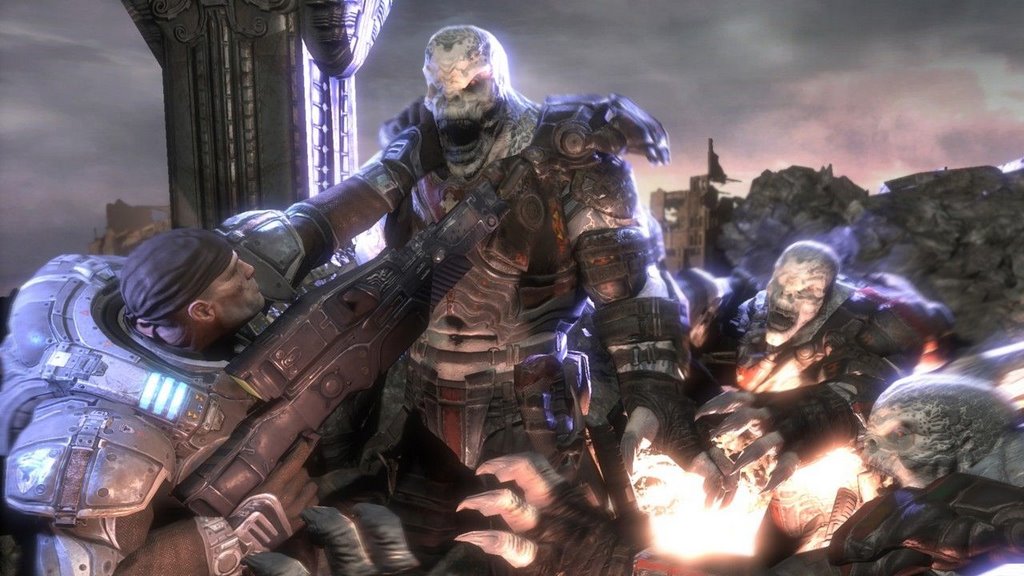
The Gears of War Review.


Buy.This.Game.
Period.


If you don't have a 360 well, buy one. Don't have Xbox Live? Buy it. Don't have an HDTV, you don't need one, this game looks amazing HD or not. The big question everyone keeps asking is, "Does Gears live up to the hype?" Well, I think I've answered that, yes Gears does. My store got Gears in on time (luckily) but, due to some confusion (On the retailers part) on when they were receiving the game and on top of that, shipping problems with major retailers some stores still don't have it. So due to my attaining a copy before some people, my Live account has been flooded with messages and voice chat requests. Most people asking how it is, but some jaded "friends" (Sorry UK!) have even sent me hate mail because they won't be getting Gears for "a while". Sorry, enough ranting...


This is the best looking game on any console to date, period. The graphics are amazing but that not why this game looks so good. The architecture and attention to detail in every, building, car, soldier, gun, water, lava, mine cart... yeah there's mine carts. But that's not all, the game sounds amazing too, Cliffy B. has been credited for spending tons of time wanting the guns to have just the right sound to them. The gun fire and explosions are crisp and not too over the top. (5.1 audio puts you right in the action) The controls couldn't be any tighter, and with really only 3 buttons that you need to use (Shoot, Reload, Cover) it couldn't get much simpler.
Anyway, on to the review.


Single Player

The game starts off with our anti-hero's being freed from jail (for disobeying the Army to go save his father), to rejoin the fight against the Locust Horde in the 11th hour. Single player takes off with a bang and doesn't ever stop, every level, every scene is jam packed with suspense and action, a "Tactical shooter meets horror movie" as Cliffy puts it. The environments are varied and there is no repetition a la Halo (and most shooters to be fair) so you don't get that sense of didn't I do this already? You fight from the streets, houses, factories, back alleys, underground, and even on frigin' mine carts! Rain or shine, light or dark, this game has all the environments and it does them superb. The one grip I have with single player is the story, they never tell you anything. I learned more about the story from the manual that came with the game then I did playing it! Setting up for a sequel is one thing, but at this rate they better be making 10 games. But once you chew through the seemingly short single player, you're ready to move on to the meat of Gears:


Multiplayer

This is where you will "lose" countless hours of your life. The fast paced 4 vs 4 team multiplayer action is what Gears was made for. Gears proves that tons of options, configurations, and players aren't needed to make the most awesome multiplayer experience ever. There are only 3 game types in Gears:

  1. Warzone - Basic team death match, no re-spawns, last man standing (and his team) win.
  2. Assassination - Each team has a leader, and your object is to kill the other teams leader.
  3. Execution - (From the manual) This game type is similar to Warzone, but instead of dying after you have been knocked down... (From me) ... You have to finish off your opponent with a classic "curb stomp" or the ol' chain saw!
Execution is by far my favorite game type, it inspires more teamwork and cooperation, not to mention sometimes a second chance. It also leads to my favorite quote from Gears lead man Cliffy B. :

"I was getting tagged by this guy, he had me down and was coming over to stomp me, and my buddy came in around the corner like, 'Here comes the cavalry' and knocked him down. My buddy intentionally didn't kill the guy, because he knew he was no longer a threat at that moment. He knew the more important thing was to resurrect me before I bled out.So he resurrected me, but not only that, he was a gentleman and allowed me to go over and stomp the guy who had knocked me down, as this kinda nice revenge. Right then, I literally was like, F*** you! as I stepped on his head. It felt so good."

As you can tell Cliffy's got a way with words... Now reviving your teammate for revenge, that's teamwork. Another huge bonus is you accually start with (arguably) the best weapon in the game, the Lancer (AKA Chainsaw Gun!). Unlike Halo, where you get a single SMG to start, in Gears off the bat you're ready to kick some ass. The only grip I do have with multiplayer is you can't go with your friends into ranked matches, bummer. MS says this is to prevent cheating, but I feel I would rather deal with some guys trying to boost so that I can play with my buddies. It's tough seeing 15 friends of mine all online playing Gears, but I can't join 'em cause they're in ranked games, and who can blame 'em? That's where all the competion is. It's OK to play the unranked games for a while, but it's plagued with people that don't care. So they quit early, or don't play right, and run around like dumbasses, you know the type. This is a must fix for Gears to stand the long haul like Halo 2. Level design in multiplayer is fantastic as well, this game shipped with 10 great maps with more promised through the marketplace, if you've got Xbox Live this game is a must have. Get ready to kick some ass and chain saw your buddies (in unranked...) Gears of War, it will blow your sock off. I'm off for some more.

For All Your 360 News Check Out: 360insight